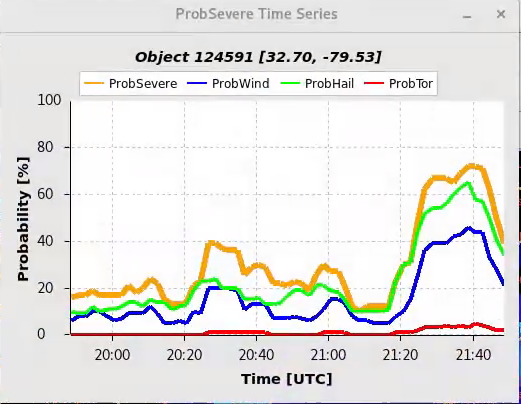
ProbSevere on some early storms near ARX

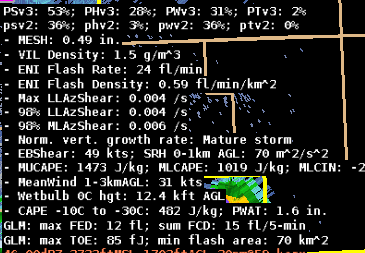
We noticed a relatively high ProbSeverev3 (53%) on a rather innocuous looking storm (MESH around 0.5”) around 2030z. This was higher than the v2 value of 36%. The individual probs were relatively evenly weighted at lower values near 30%.
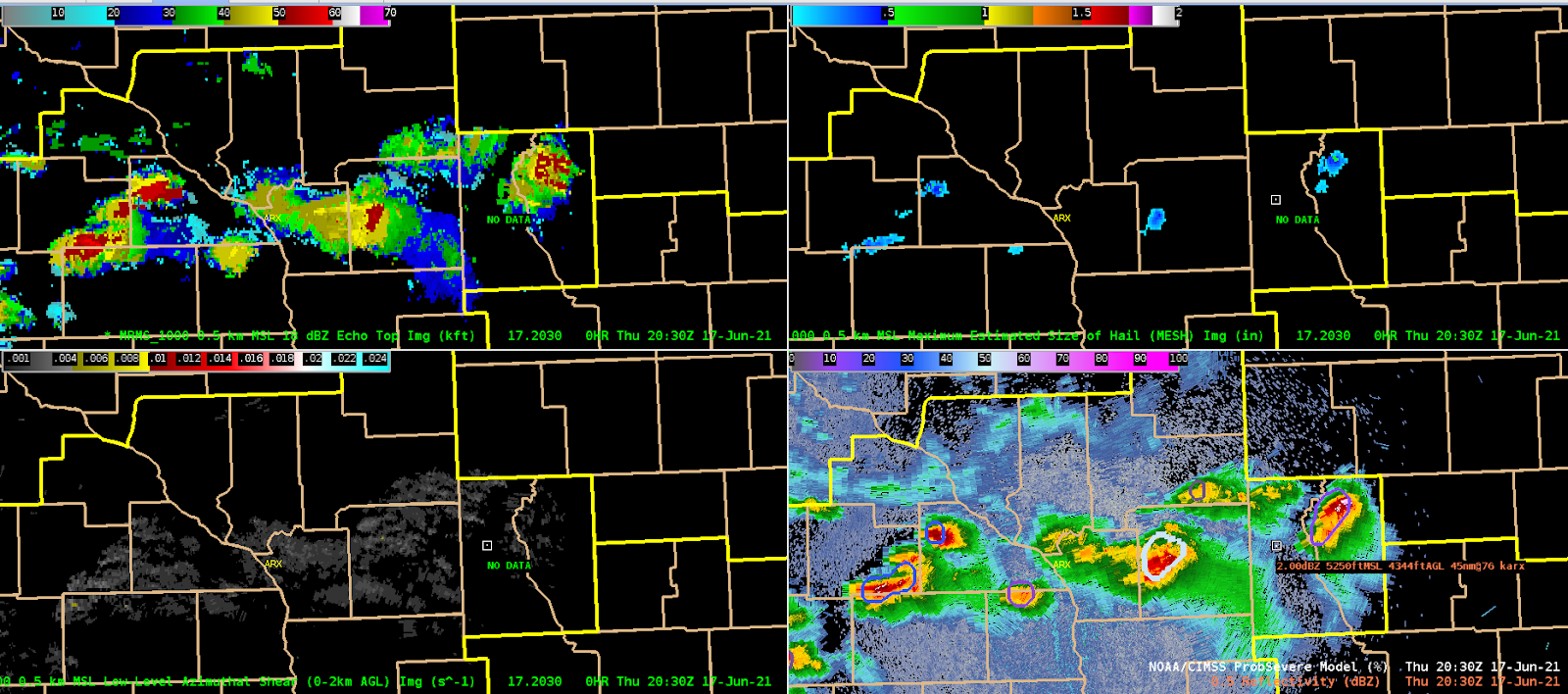
(clockwise from top left) MRMS 18dbz echo top, MESH, reflectivity and ProbSevere (storm in center), and low-level MRMS azimuthal shear.
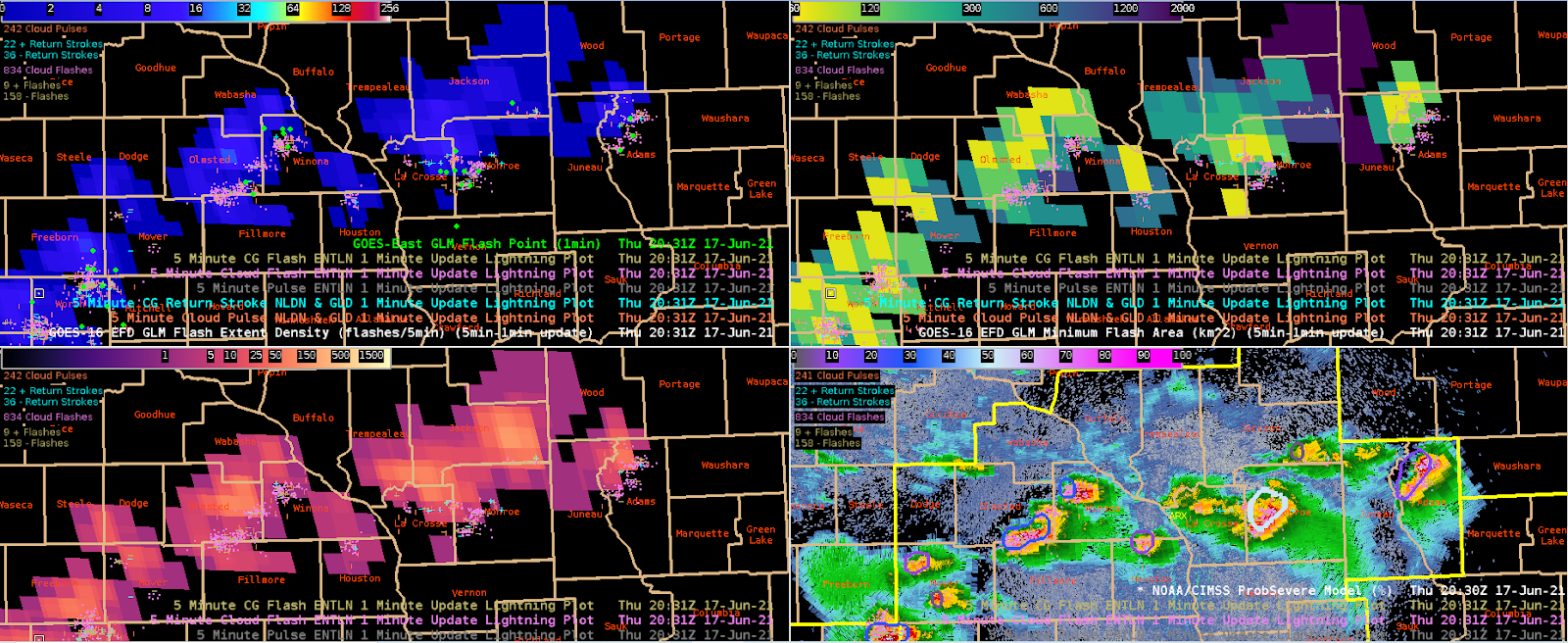
(clockwise from top left) GLM FED, GLM MFA, reflectivity and ProbSevere (storm in center-right), and GLM TOE.

GLM FED was unimpressive, though it’s unclear how much of this is related to lower detection efficiencies in this area. ENI total lightning was halfway decent. High DCAPE values and other environmental parameters may have been sending the ProbSevere v3 higher.
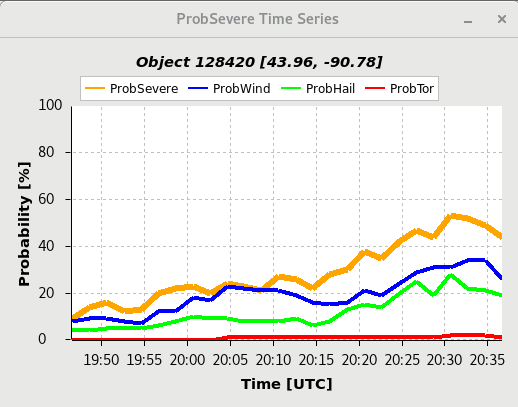
Timeseries for the storm of interest.

Another storm further to the west over SE MN had slightly lower MESH (.39”) but in this case PSv2 was higher at 48% vs Psv3 at 23%.
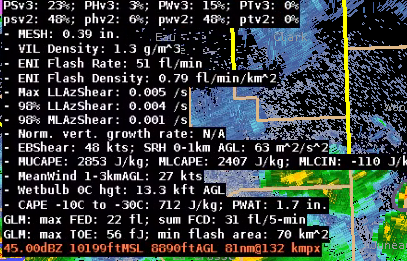
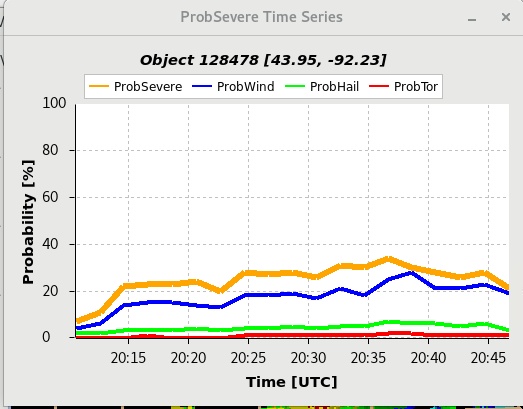
– Barry Allen
Tags: None

ProbSevere Time Series

I found the ProbSevere time series helpful today as we “triaged” storms and tried to identify storms that may become severe. While the capping inversion stayed strong and therefore prevented storms from becoming severe, it was great to see storms follow a similar intensification process identified by the Prob time series time graph. Most storms intensified in a similar fashion but capped out when ProbSevere reached ~40%. After 40% storms would remained steady state and then gradually weaken. Noticing these trends and seeing them plotted visually helped us pick up on the trends. Any storm that deviated from this and grew upscale faster would be easy to identify on the ProbSevere time series graphs. We knew what the “norm” was for storms in this capped environment because of the time series graphs. We surmised that once the cap broke (which would be after the experiment ended), we could quickly ascertain when storm would finally be able to grow upscale by looking at their respective time series.

– Fear the Shear

Tags: None

Progressive Disclosure & GLM Flash Points

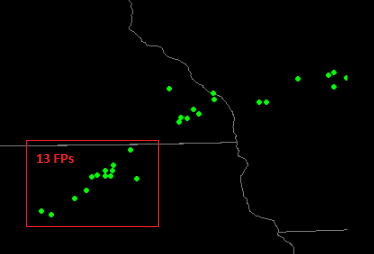
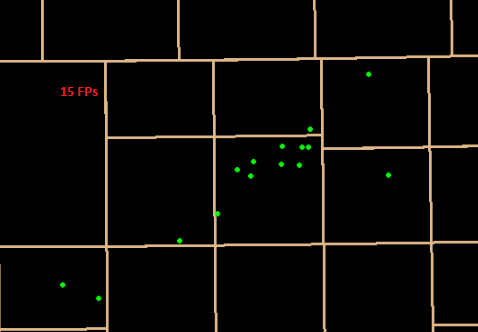
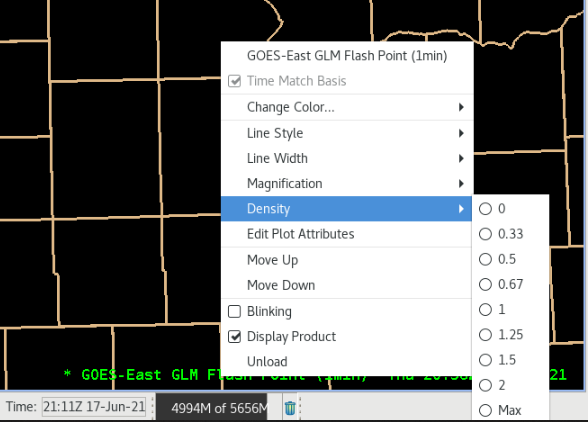
When loading GLM Flash Points, there is no preset density of the data.

This does affect how much flash point data is displayed depending on the zoom level of the map. In the 2 maps below, within the red square of the larger map, 13 flash points are indicated as opposed to 15 once you have zoomed in further:

Unless the forecaster knew to increase density to max, this could obscure some important clusters of lightning coincident with storm evolution.

– Guillermo

Tags: None

GLM Flash Points

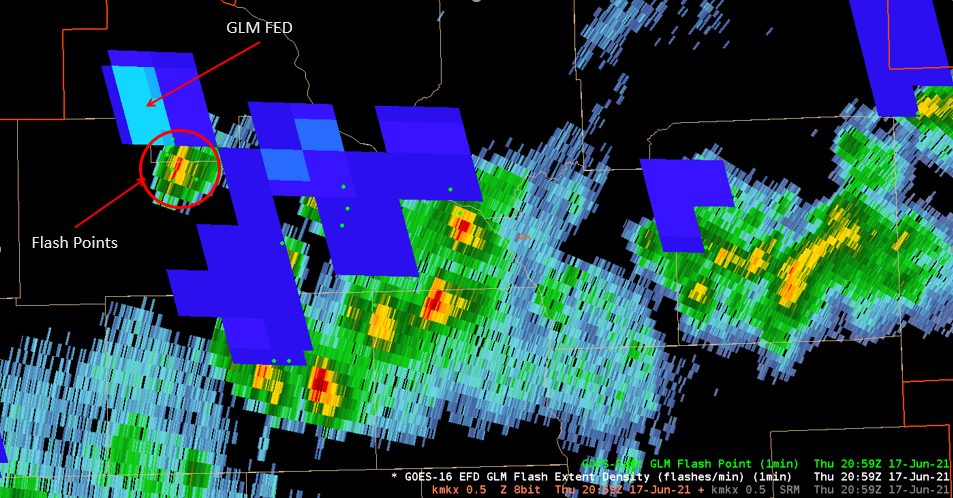
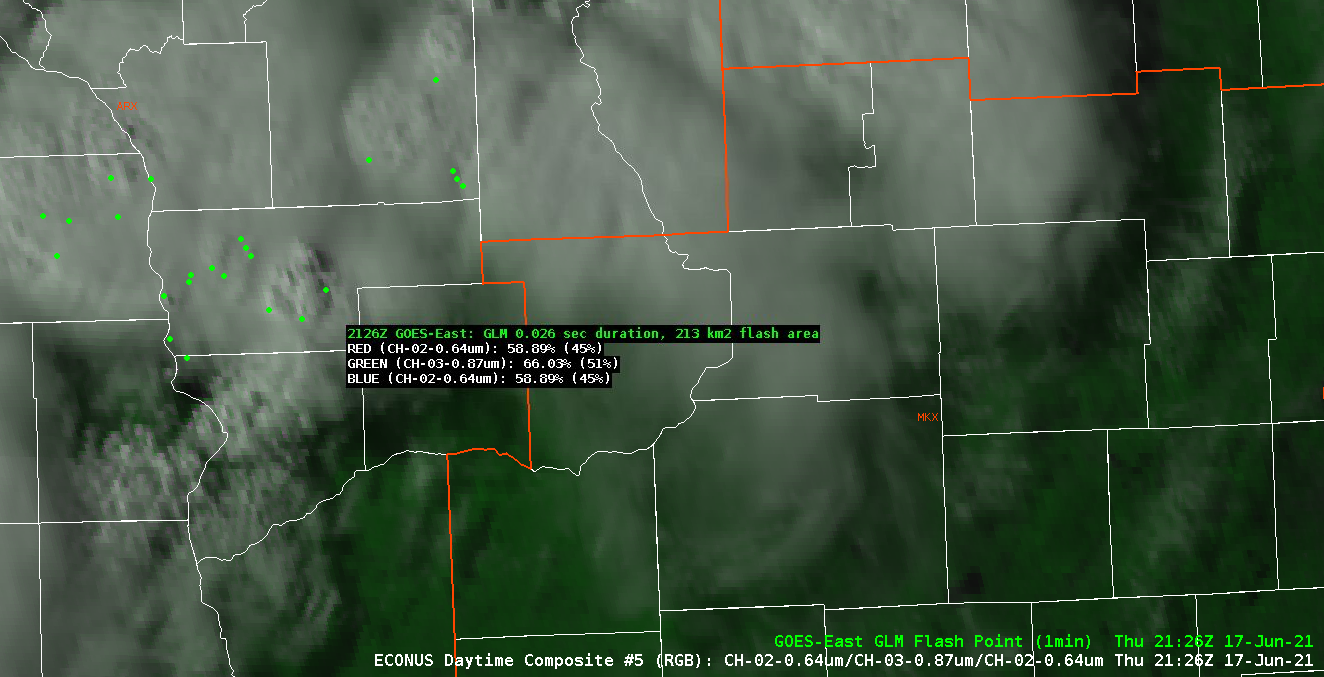
Noted GLM flash points really help speed up the process of identifying where the cell of interest was located.  In the past, I would have to make a manual, on the fly “calculation” in my head where the actual cell was located.  If there was only one cell, that was easy by looking at radar.  When you get into the complex thunderstorm situations, that can be difficult and in the worse cases, it is too involved.  Seeing how the flash points seems to fix and/or surround the updraft, really helps speed this process up and give confidence to the forecaster which cell is the cell to be worried about.  This could also help with warning confidence.  The  image below shows an prominent example of this.

It is hard to see the flash points but there are 6 points surrounding the core of this small storm.  I chose this one to verify the positioning as it was on its own so it was easy to figure out which one it came from.  As such, seeing how close this is to the core, it makes it much easier to identify which FED “spike” is from which core.  

When looking at satellites with flash points, it also help confirm the location of the core as the ABI imagery is parallax corrected.

– Strato-Dragon

Tags: None

GLM Lightning Preset 4-Panels

GLM lightning data provides very useful information to the operational forecaster, especially when properly combined with radar/satellite imagery. Would it be possible to take best practices suggestions from frequent users to lead to the creation of some pre-set 4-panel procedures that could be found in the AWIPS GLM data section (similar to what is available with radar base date, etc.)?

Sample 4-panel image pulled from the GLM Quicklook Guide

– Guillermo

Tags: None

Derived Motion Winds in AWIPS vs Rabin Optical Winds

Had attempted to compare the AWIPS Derived Motion Winds to Bob’s Optical Winds: https://www.ssec.wisc.edu/~rabin/winds/goes16/b13/1/m1/iris/layers_loop.html but encountered eventual CAVE crashes each time. While, on occasion, being able to display and toggle different layers of DMW in AWIPS before crashing, I did find that the Optical winds had much higher resolution wind data than what was available in AWIPS (with max density) and wind directions, by layer, seemed to well agree.

It is my opinion, though, that, while the DMW winds in AWIPS could be useful, they seem resource-intensive and come with a significant likelihood of freezing or crashing the CAVE instance. I find it much quicker and more reliable to view the similar data via Bob’s webpage.

– Guillermo

Tags: None

Modified NUCAPS Soundings-FSD

Noticed some issues with the modified NUCAPS soundings in the FSD area.  In some of the cases where the odd errors in the soundings.  Not sure what caused them or why they showed up but here are some examples.

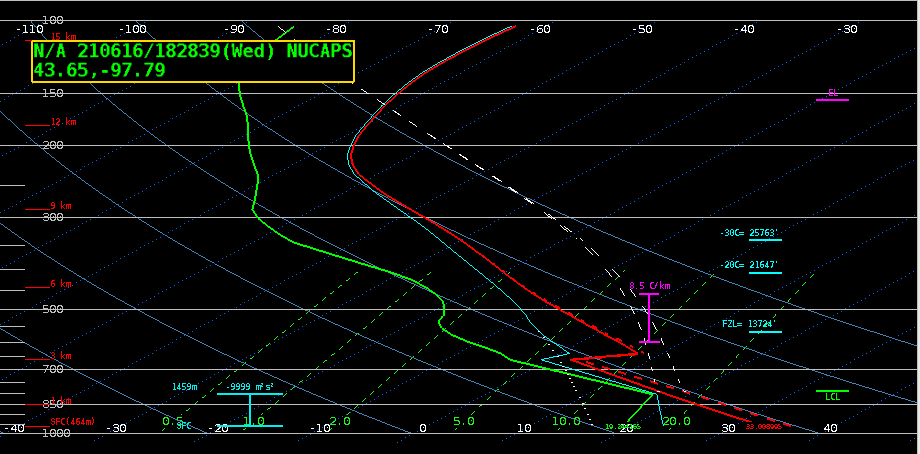
First pass of NOAA-20.

Note the odd look of the temperature trace in the mid levels (note the sharp increase in temp just above 700mb).  This was noticed in a number of the neighboring dots.  This error seemed to get better the further away you got from this location.  We were hoping this would improve when the second pass came overhead later at 20Z.  Below is an example of this error from the second pass.

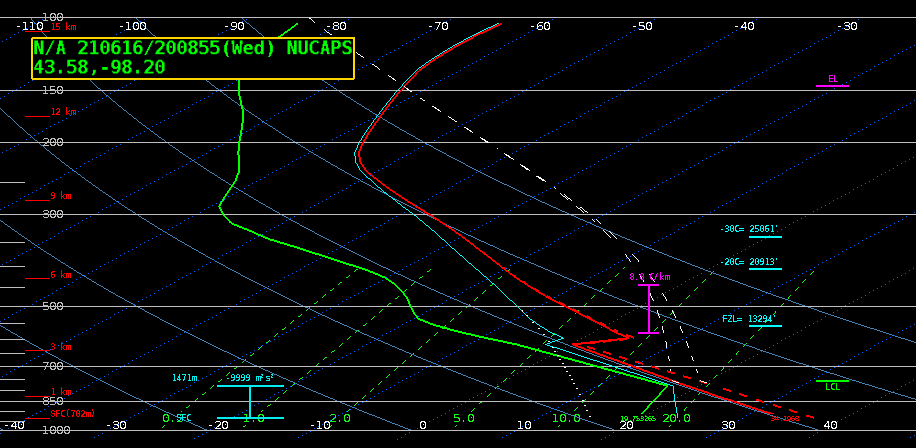
Second pass NOAA-20.

As can be seen from the image above, the second pass still had this error (note the sudden change in the temperature trace at about 600mb).  After looking at the conditions in the area, several questions as to why this was occurring came up.  It appeared the surface temperatures were rather reasonable and the atmospheric conditions were also close to what the sounding may be trying to depict.  There was some thought the modified NUCAPS may be having difficulty with the moisture trace rather than the temperature trace.

It was also noted that when using the “pop up skew-T” function it would not see this error.  It was discovered the reason for this is the “pop up skew-T” function would not see the modified soundings that Nsharp would display.  

Why this was occurring I really could not tell.  One of the PIs indicated the algorithm may not be handling the moisture trace well.  It was also noticed the surface wind fetch was coming from the southwest and that is coming off the sandhills of Nebraska.  This is a very wet area and is perpetually wet.  Is it possible that some localized moisture advection was not accounted for?  Can’t say for sure but mention it here to indicate what could be going one.  

-Strato-Dragon

Tags: None

NUCAPS MultiSat Sampling

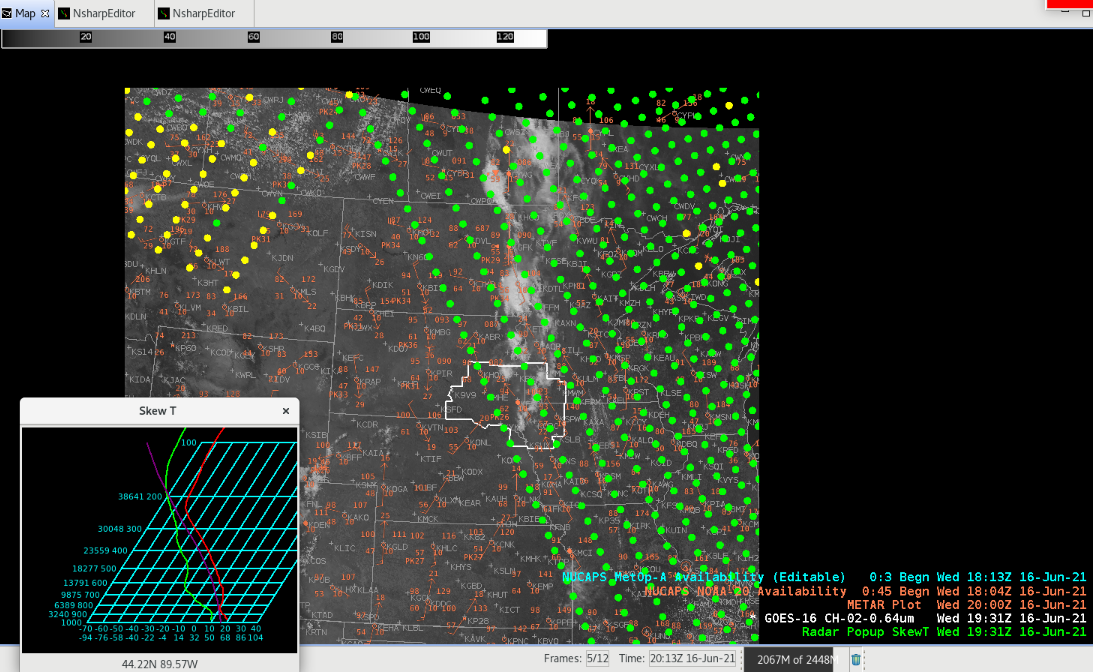
I was pleasantly surprised to see that when multiple sources of NUCAPS data were displayed at the same time that I could sample, via the pop up Skew-T and moving the mouse across the sounding swath, all sets of NUCAPS data and that it wasn’t dependent on which source of NUCAPS was ‘editable’.

However, depending on WHICH source of NUCAPS soundings was indicated as ‘Editable’ (in this case, the METOP-A – in blue), only those soundings could be opened in the NsharpEditor. Not necessarily a big deal but it is something that some folks may need to have explained to them.

Additionally, I have found the pop up Skew-T doesn’t always work. Often, it seems that when the NUCAPS data is more than an hour old or so, moving the mouse across the soundings results in no changes in the pop up readout. Is this related to the ‘age’ of the NUCAPS data or a bug with the pop up Skew-T?

Similarly, a new pass of data came in and I was unable to get updated readouts from the pop up Skew-T, therefore I ‘unloaded the “Radar Popup SkewT” (green legend, above), turned off sampling, then went back through the process of Volume > Popup Skew-T, turning on Sampling (right click), and sample cloud heights from NUCAPS (top of right click menu) and was able to then sample the NUCAPS.

– Guillermo

Tags: None

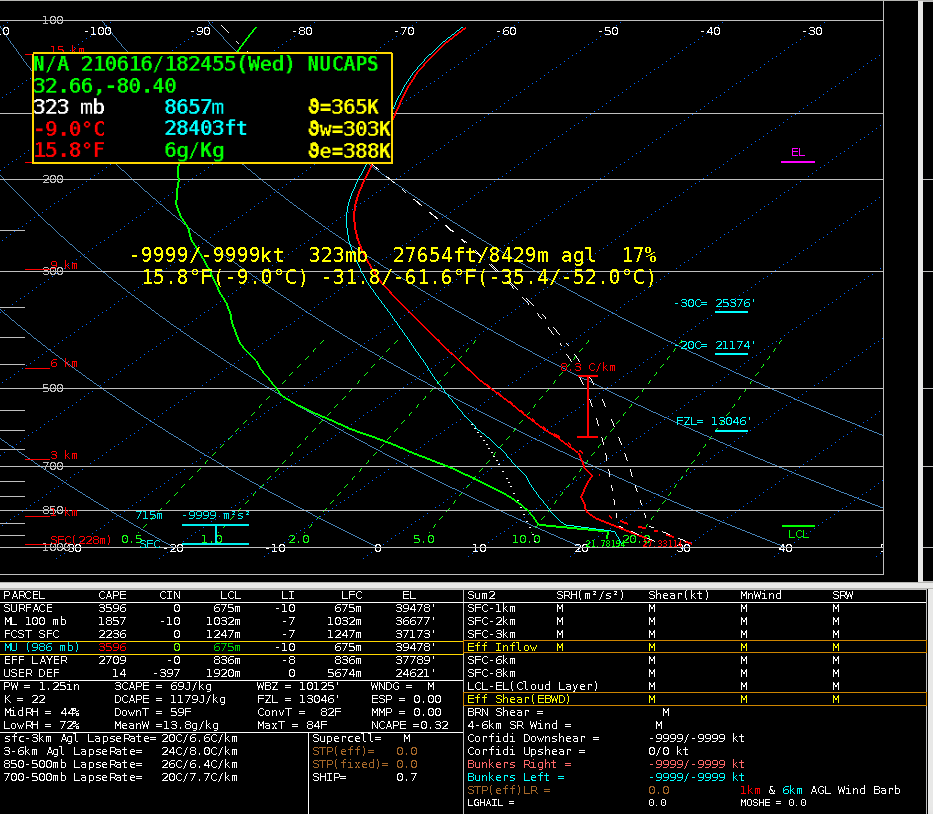
NUCAPS sounding near Charleston

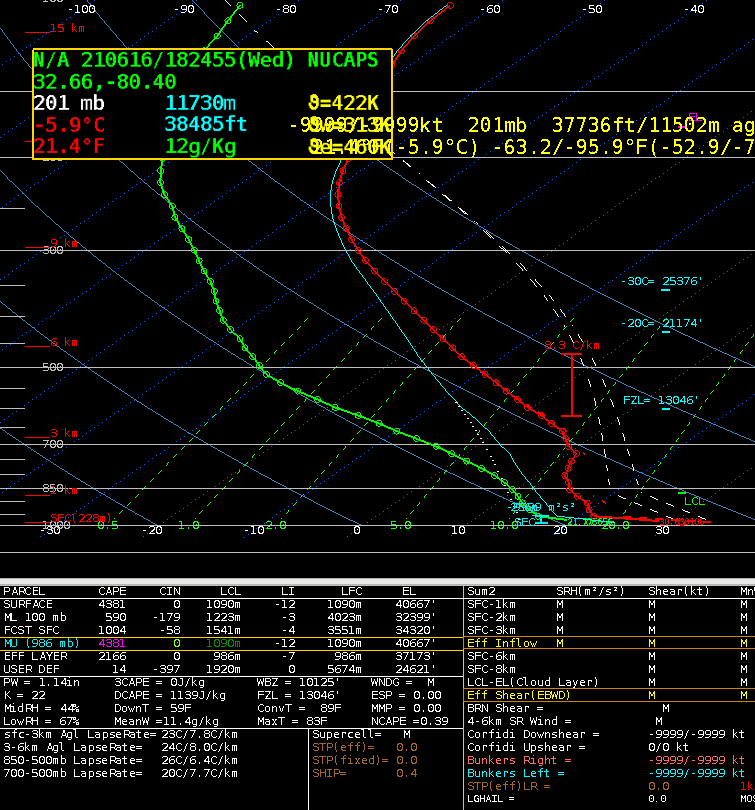
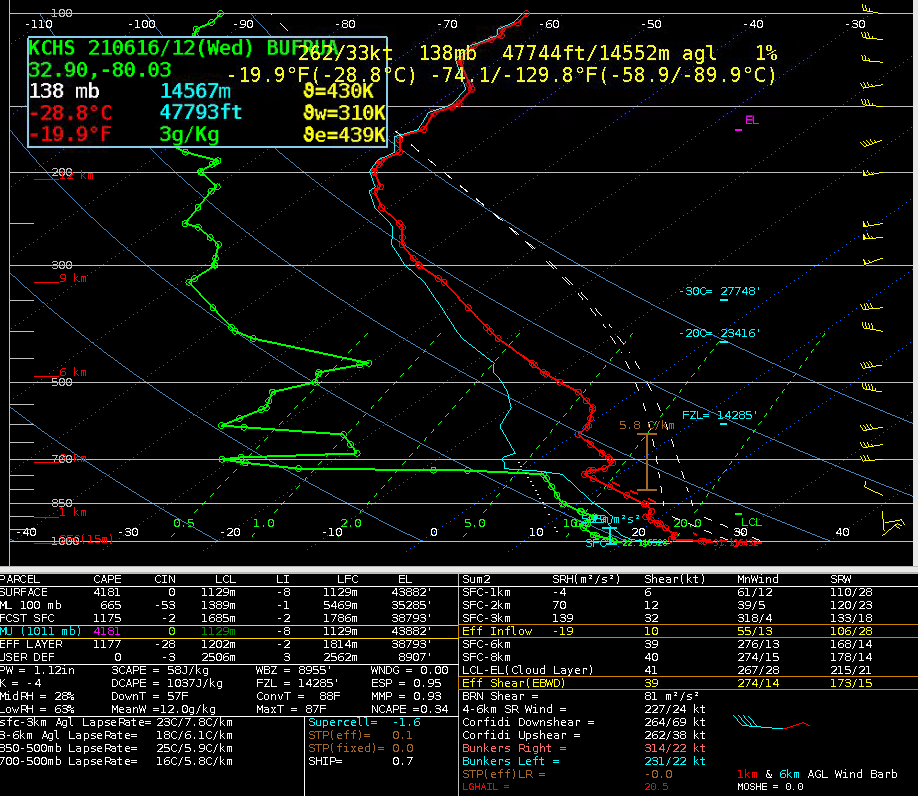
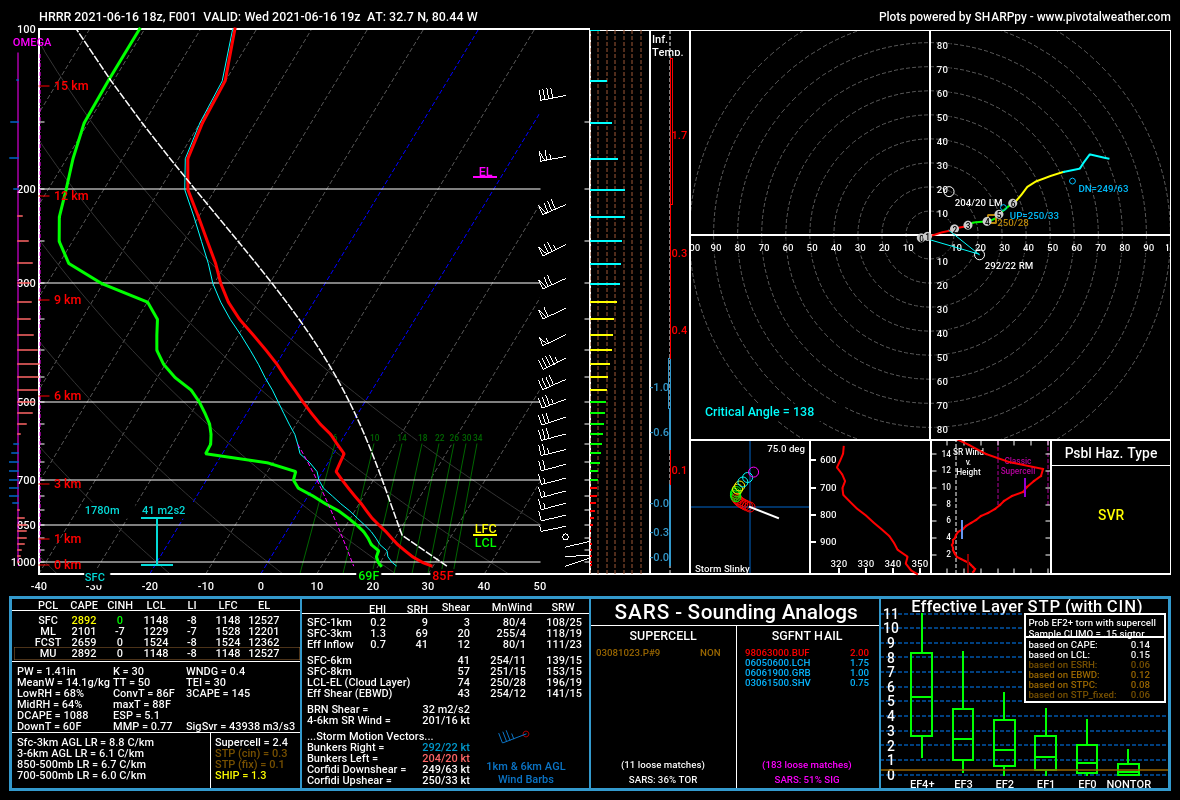
I made some comparisons between a NUCAPS sounding at 1824z near Charleston, SC and the 12z observed sounding at Charleston, SC. Both soundings were manually modified to a surface temp/dew point of 87/72 (modified NUCAPS soundings were unavailable at this location). Overall the NUCAPS sounding matches the overall profile fairly well with mid-level drying and a fat CAPE profile aloft, with similar SBCAPE, PWATs, and DCAPE values.  I did notice a warm layer centered near 700mb (the base of what appears to be an elevated mixed layer), which resulted in higher MLCIN values and higher 700-500mb lapse rates. This could indicate more capping than is actually present, though perhaps stronger convection where the cap does break. This warm layer also appears warmer than in an 18z HRRR initialized sounding at the same location.

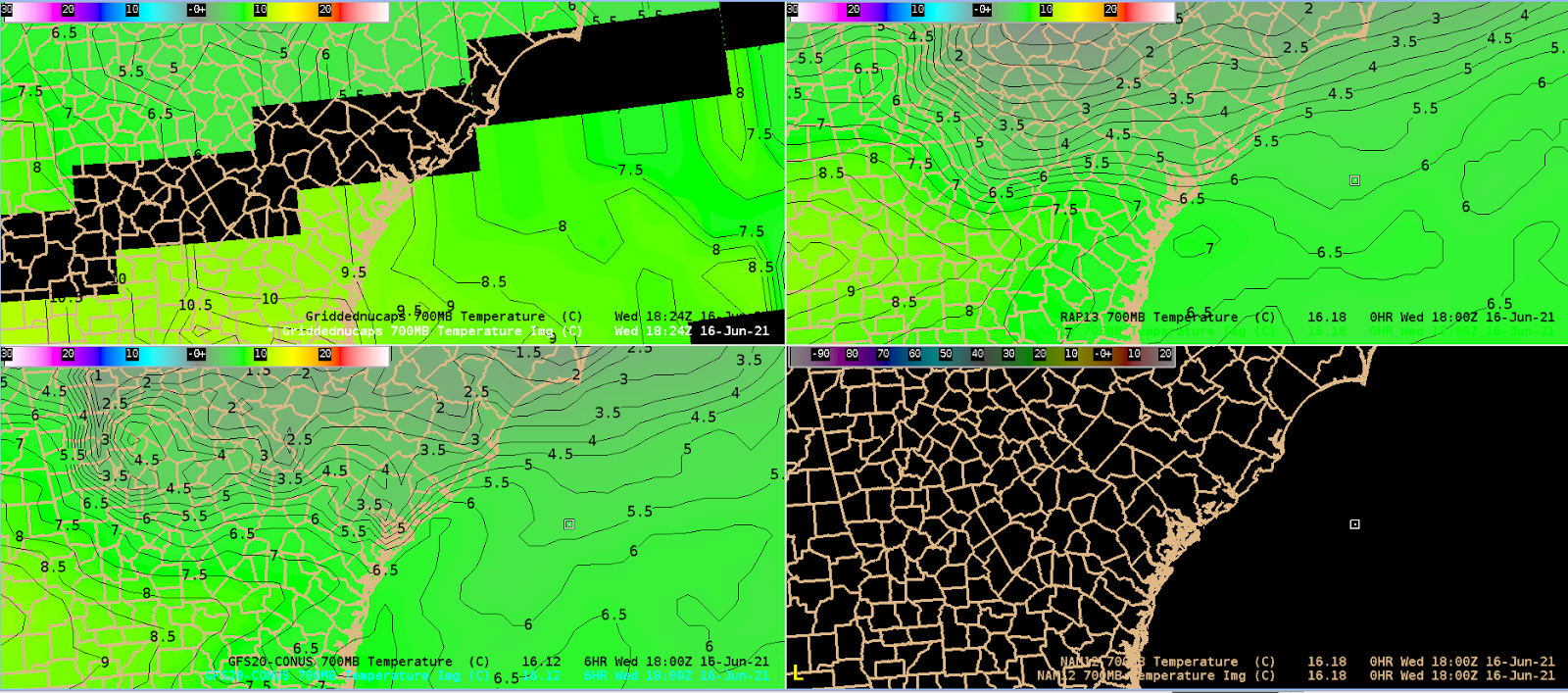
I also looked at Gridded NUCAPS 700mb temperature data compared to 18z 700mb temperatures from the RAP and GFS. While there was some missing data in the area of interest from Gridded NUCAPS, the values just south of that area are higher than what the models were showing.

Late day update: the modified NUCAPS soundings eventually filled in.

It was a few degrees cooler at the surface, but that may be because it went off the 17z RTMA rather than the 18z METARs at that time.

– Barry Allen

Tags: None

ProbSevere and GLM with supercell moving offshore the South Carolina coast

A thunderstorm located east of Charleston appeared to have some supercell characteristics as it moved south-southeastward towards the coast, with a kidney bean shape in reflectivity and a weak mid-level mesocyclone, as well as some deviant motion from the northwesterly flow. As it was over land it appeared to be strong but sub-severe, and maintained generally consistent 20 to 35 percent ProbSevere in v3. ProbSevere v3 seemed more consistent overall, with v2 jumping up and down more often, dropping down into the single digits at times. ProbSevere v3 did jump down below 20 percent briefly when GLM FED really dropped down. But the consistent lower-end probabilities at least indicated that this was a storm to be watched relative to the lower v2, and this may have at least allowed lead time on a low-end special marine warning before it moved offshore and strengthened.

The timeseries is somewhat useful if you just have one storm to look at, but with multiple storms I would probably just look at the loop in the ProbSevere plan view instead.

After it moved offshore, GLM FED increased, slightly in advance of a jump in MESH and associated jump in ProbSevere v3. ProbSevere v2 jumped ahead of v3 in probabilities as often occurs, though at that time MESH around 0.9 inches may have warranted the more conservative ~50-60% v3 approach. Later MESH jumped up to around 1.3 inches, and ProbSevere v3 jumped above 70 percent at this time as well.

Clockwise from top left: MRMS 18dbz echo top, MESH, reflectivity/ProbSevere/low-level azimuthal shear at 2130z.
Clockwise from top left: GLM FED, minimum flash area, reflectivity/ProbSevere, total optical energy at 2130z.

– Barry Allen

Tags: None