DTA/Time Series thoughts on the SVR Cell

Check out the ENI Plots/Time Series for the severe storm going through the NW corner of EWX’s area.

I want to point out the storm history on the “tail” trailing behind the storm. We noticed even on reflectivity that the storm had come down briefly and then went back up. Check out where I put the white “Y” looking thing. Right there it went down to an “orange” alert (significant thunderstorm alert) and then you can see it went back up to Dangerous.

Side note: I have no clue why there is a DTA going to the northeast on this storm. It is consistently moving to the southeast.

ENIGood

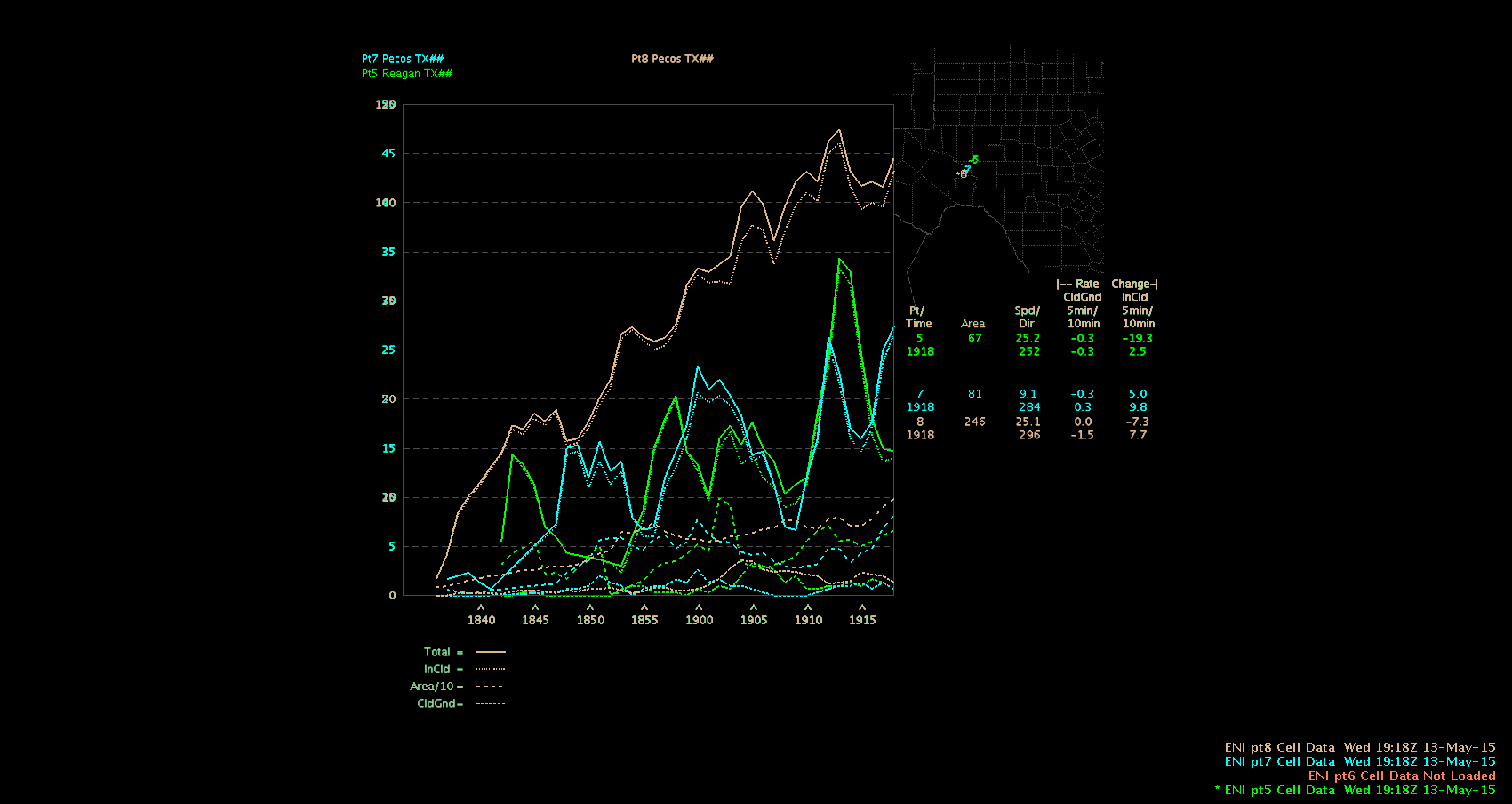
Here is the time series for the storm as well. You can see the decrease in lightning around the same time the alert downgraded from the DTA and then back up.

LTG-TimeSeries


Lauren13


Tags: None

NUCAPS Sample

In southwest TX.  Modified for the surface.  Severe thunderstorm with a TBSS moved through the area later.

10

11

Plus, another point to the north where nothing happened.

12

-Champion

Tags: None

ENI Time Series Plots – Ways to View

I’m a big fan of the ENI time series plots. There are a lot of different ways to view the plots themselves, between the mono- and multi-color plots, 4-panels, etc. I wanted to compare them and see which might be the most useful.

First, it is helpful to have a dedicated pane for the ENI DTA cell polygons and cell flash rates, with the Interactive Points overlaid on it. Move the points to 4 (or less) different cell polygons. You have to keep moving the points to keep them within their respective cell polygons, which is time and work-load intensive if you are in an intense warning situation.

point7

There are 4 main ways to view the time series data:

The 4-panel mono-color: better for seeing overall trends in flash rate with multiple cells. In general though, I don’t like the mono color. There’s all these lines and everything is the same color, it’s hard to differentiate what you are looking at.

4Panel_mono

The 4-panel multi-color: better for keeping track of the partitioning of Total, CG, cloud, etc.

4Panel_multi

The 4-panel multi-color and mono-color are each a good way to view multiple cells at once. they can be viewed all on one screen or larger by entering panel combo rotate mode. If you are looking at one storm in particular, or there aren’t many cells around, viewing the single panel multi-color is probably more useful.

Single-Panel Multi-color (single cell): Great for situations where there aren’t many cells going on, and you really want to investigate the cell for warning purposes. Seeing the trends in the various flash components can help decide if a storm is intensifying or weakening.

single_multi

Single-panel Stacked:

The single panel stacked is not very appealing. If you have a lot of cells at once, the plot can get very busy, very quickly. Yes, you can turn cell off to focus on one or another, but then the individual plots are still mono-color and difficult to pick out the flash components.

SinglePanel_stacked

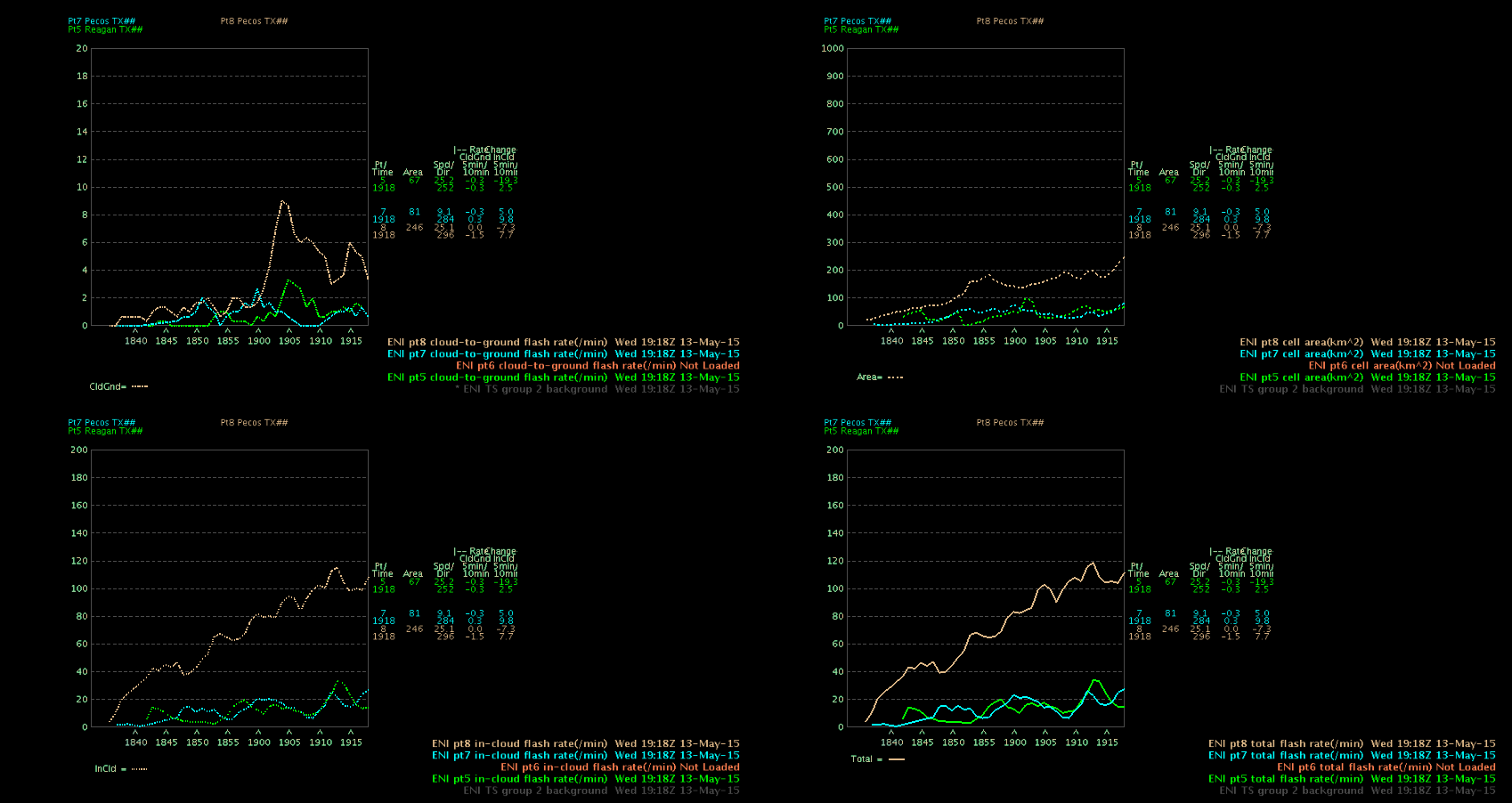
And finally, a 4-Panel composite. The composite product is interesting. It is a stacked 4-panel with each panel devoted to one of the time series components. While it is interesting to look at, I don’t see the utility in a real-time warning situation. It might be good to archive or screen capture and use for case studies after the fact or something like that.

4Panel_composite

Overall, I find the 4-panel mono-color and the single panel multi-color (or 4-panel in panel combo rotate mode) the most useful of the time series displays. The 4-panel mono-color gives you a good overview of the trends for all cells you are tracking. The multi-color plots are very helpful in analyzing individual cells. When comparing with radar reflectivity, you notice changes in the flash rate before the cell exhibits increases or decreases in reflectivity. The faster updates of the flash rate data allows you to see trends in storm cells before they show up in the radar products. This could be immensely helpful in the warning process with a “heads up” without waiting for “one more radar scan”. In the Southwest US, especially, waiting one more scan can be the difference between hitting or missing a warning.

~Regina Phalange

Tags: None

ENI vs ProbSvr for Developing Storm

In the line we are watching the southern storm started to strengthen more than the middle storm.  At 2044Z it started showing something like below with both storms in one PorbSvr bubble. It took until 2058z for it to slowly make the southern storm larger. After this scan, at 21z, it finally split the two storms.

2stormProbSvr


However, at 2047 the ENI DTA had already lost the middle cell at focused on the southern storm. This image is at 2101 but just shows how long it took ProbSvr to separate them vs the ENI DTA.

2stormENI


Lauren13

Tags: None

ENI Time Series Case Study

Setting: Northwestern edge of the San Angelo, TX CWA.

I pulled up the ENI time series for a strong cell that exhibited a high flash rate and saw a large peak followed by a rapid drop-off and a subsequent increase again. I wanted to look at radar to see if it matched up with the trend in strength. The cell in question is the northern-most cell in the short, loosely-connected line along the border of the San Angelo CWA (point 7/northern cell polygon in the image below).

point7CZ_1930 Composite Radar image at 1930Z

The northern-most cell has a reflectivity core peak corresponding to the rapid increase that the flash rate on the time series had been showing. The increase/peak in flash rate occurred between 1928-1932Z.

ENI_1930_2006ENI multi-color time series plot for Point 7

The next two radar images at 1936 and 1942Z, respectively, reflect the rapid decrease and subsequent increase again in the time series plot between 1933 and 1938.

  CZ_19361936Z CZ_19421942Z

The flash rate then began a steady, but quick final decline just before 2000Z.

ENI_1930_2010

This was finally reflected in the reflectivity scans at 2000Z and 2006Z.CZ_20002000Z

CZ_20062006Z

I found myself watching the time series plot when it would take a sharp turn to increase or decrease flash rate and going back to the radar, waiting for it to be reflected there, and it usually did. Since the lightning data comes in more often than/ahead of the radar imagery, the time series plots could be used to anticipate increases or decreases in storm cell strength, potentially aiding in the warning process (ie whether to issue (lead time), continue, or let a warning expire).

~ Regina Phalange

Tags: None

Misleading Lightning Jumps

ENI lightning data has been useful at times today.  However, when monitoring lightning jumps all forecasters must exercise caution. The charts can be misleading when tracking cells. Watching the last hour of data in SJT, one can see lightning cells converge, causing a tremendous spike in lightning strikes.  This could lead a forecaster to believe the storm is strengthening, when in fact data is being absorbed. A forecaster must use different tools and further investigate to ensure lightning jumps are indeed really happening.


Panel 1 shows a lightning jump.

051315 lightning jump 2042

This image shows how two different cells later converged according to ENI leading to an unwarranted lightning jump.

051315 eni cell absorbtion

UFFSU

Tags: None

ENI and splitting cells

We are watching a line of storms that the ENI Alerts are handling very well. I took these screen captures to watch and see how the alerts handled the split.

This is at 1958z looking at the northern line of storms you can see a cell rapidly developing in the middle of the two with alerts.

eniSPLIT1958

Here at 2010z…it caught the split but put the alert to the northeast which is not the general direction of the line at all.

enisplit2010

Lauren13

Tags: None

CI with a developing line

We have been watching a line of storms that have continued redevelopment on the south side….

line

The south side keeps popping up new cells and actually the CI is picking up on that very well.. (the orange one towards the left).

I have been tracking this southern line and looking at radar and it is picking up on the new cell initiation.

This is at 2015Z.

CIonline2015

Then here is the next image at 2030z.

CIOnline2030


And here is the line at 2044Z

radar2044

Lauren13

Tags: None

ENTLN 5 Minute Data Very Misleading

Image 1.  AWIPS Time 1921Z.  5 Minute ENTLN Lightning Plot 1920Z.  Pulse Count (Upper left corner) 255.

3

Image 2.  AWIPS Time 1922Z.  5 Minute ENTLN Lightning Plot 1920Z.  Pulse Count (Upper left corner) 327.

4

Image 3.  AWIPS Time 1923Z.  5 Minute ENTLN Lightning Plot 1925Z.  Pulse Count (Upper left corner) 160.

5

Image 4.  AWIPS Time 1924Z.  5 Minute ENTLN Lightning Plot 1925Z.  Pulse Count (Upper left corner) 175.

6

Image 5.  AWIPS Time 1925Z.  5 Minute ENTLN Lightning Plot 1925Z.  Pulse Count (Upper left corner) 222.

7

Image 6.  AWIPS Time 1926Z.  5 Minute ENTLN Lightning Plot 1925Z.  Pulse Count (Upper left corner) 286.

8

Image 7.  AWIPS Time 1927Z.  5 Minute ENTLN Lightning Plot 1930Z.  Pulse Count (Upper left corner) 137.

9

Critical issue: The 5 Minute ENTLN Lightning Plot is adding new lightning data every minute and “resets” after 5 minutes.  It is NOT a 5 minute total based on the previous 5 minutes as it seems.  It is not a 5 minute running average (that could be updated every minute).  When the forecaster loads the most current frame they are getting data that is misleading.  In the case above it appears that the storm is strengthening from Image 1 to 2, then weakening from Image 2 to 3, then strengthening from Image 3 to 6, then weakening from Image 6 to 7.  In reality, it’s just the addition and reset of the 5 minute lightning data.  Not only is this misleading, but it is detrimental to forecasters trying decide whether to warn or not based on this data.  I certainly won’t use this data until it’s corrected and will pass this information on to others.  I don’t understand how someone in their right mind can find this current scheme above good.

Furthermore, the 5 Minute ENTLN Lightning Plot doesn’t match the AWIPS time.  In Image 3 the AWIPS Time is 1923Z, but the 5 Minute ENTLN Lightning Plot is 1925Z (in the future?).  Why???  In this case the 5 Minute ENTLN Lightning Plot should stay labeled as 1920Z and update to 1925Z after the AWIPS clock hits 1925Z.

What’s also worrisome is it appears other ENTLN Lightning minute products are “adding” new data every minute (i.e. the 5 and 15 Minute Lightning grids, etc.).  This needs to be looked into more and corrected.

How should this be fixed?  The 5 Minute ENTLN Lightning Plot needs to update AFTER it gets 5 minutes worth of added data.  In the example above it should work as…

AWIPS Time 1921Z.  5 Minute ENTLN Lightning Plot 1916Z.  Pulse Count (Upper left corner) NNNN where NNNN is the previous 5 minute total from 1911 to 1916Z.

AWIPS Time 1922Z.  5 Minute ENTLN Lightning Plot 1921Z.  Pulse Count (Upper left corner) 327.

AWIPS Time 1923Z.  5 Minute ENTLN Lightning Plot 1921Z.  Pulse Count (Upper left corner) 327.

AWIPS Time 1924Z.  5 Minute ENTLN Lightning Plot 1921Z.  Pulse Count (Upper left corner) 327.

AWIPS Time 1925Z.  5 Minute ENTLN Lightning Plot 1921Z.  Pulse Count (Upper left corner) 327.

AWIPS Time 1926Z.  5 Minute ENTLN Lightning Plot 1921Z.  Pulse Count (Upper left corner) 327.

AWIPS Time 1927Z.  5 Minute ENTLN Lightning Plot 1926Z.  Pulse Count (Upper left corner) 286.

This allows me to see the total trend every 5 minutes.  Going from a Pulse Count of 327 down to 286 is more informative.

Get the point?

-Champion


Tags: None

Line Formation with CI Prob

CI Prob continues to handle the developing line heading into western SJT cwa.  Visible satellite hints at outflow and developing clouds, but CI Prob helps confirm new storm initiations.  The 1930z 4 panel view shows the higher probability of thunderstorms developing along a line.

051315 CI Prob continued

The larger view of the radar helps us verify the lengthening of the line into MAF cwa. These storms continue to move slowly SE. It should also be noted CI Prob is also indicating thunderstorm development ahead of the current line.  This area of convection will be contained in central SJT cwa. Will continue to monitor any possible development to see how CI Prob verifies in cloud/cirrus setting.

051315 developing line

UFFSU


Tags: None